

If you’ve been selling on Amazon for any length of time, you already know the truth: the quickest way to grow your revenue isn’t by hoping for more traffic, it’s by increasing the value of every customer who already lands on your listing. Multipacks have always been one of the most reliable ways to do that. The logic is simple: if customers buy two or three units at a time, your average order value jumps, your margins improve, and your advertising becomes more efficient almost overnight.
But traditionally, multipacks came with their own set of frustrations: physical bundling, extra FBA prep fees, new packaging, new labels, new SKUs, more storage space, more replenishment headaches… You name it. Many sellers avoided them entirely unless they had the time, the team, or the packaging setup to support them.
Then Amazon quietly rolled out something new, something that, if expanded beyond the pilot, could dramatically streamline catalog management for sellers in both the US and UK. They call it Virtual Multipacks, and according to Amazon’s official documentation, these allow you to “sell multiple quantities of the same product as a single offer… with no need to physically package items together.”
Once you are logged into Seller Central, you can navigate to the Amazon Virtual Multipacks Help Page
Source: Amazon Virtual Multipacks Help Page
In simple terms, Amazon takes your existing ASIN, automatically generates pack-size variations like 2-pack, 3-pack, or 5-pack, assigns new SKUs starting with ‘VMP_’, and fulfills these orders using your existing single-unit FBA inventory. No bundling. No extra prep. No separate stock.
It’s a brilliant concept. But, there’s a catch. You only get Virtual Multipacks if Amazon decides your ASIN qualifies for their pilot, and that’s where most sellers start asking questions. So in this guide, I’ll break down what Virtual Multipacks are, how they differ from Virtual Bundles, how to check if your account is in the pilot, and what you can do to increase your chances of being selected.
If you care about AOV, ranking strength, and running a more efficient Amazon operation, this is worth your attention.
What are Amazon Virtual Multipacks?
According to Amazon’s official documentation:
“Virtual multipacks allow you to sell multiple quantities of the same product as a single offer… with no need to physically package items together.”
Once you are logged into Seller Central, you can navigate to the Amazon Seller Central Help – Virtual Multipacks
Source: Amazon Seller Central Help – Virtual Multipacks
Virtual Multipacks are exactly what many sellers have wished Amazon would offer for years: a way to create multi-unit offers without physically bundling anything. Amazon does all the heavy lifting internally. Once an ASIN is selected, Amazon automatically generates new variations, new SKUs with the VMP_ prefix, and new pack sizes, all linked to your existing FBA inventory.
These pack sizes appear as additional variations on your listing, just like colour or size variations would. In other words, your main ASIN becomes the “1 Pack,” and Amazon adds “2 Pack,” “3 Pack,” or “5 Pack” underneath as new purchase options.
You don’t ship anything new. You don’t relabel anything. And customers get the convenience of choosing a multipack exactly the same way they choose a colour or size.
Virtual Multipacks vs. Virtual Bundles: Critical difference sellers miss
Sellers often confuse Virtual Multipacks with Amazon’s “Virtual Product Bundles” tool because the names are similar. The two features are completely different.
Sellers often assume Virtual Multipacks are an extension of Amazon’s Virtual Product Bundles tool, but they’re completely different features.
The Virtual Product Bundles tool, documented here: Once you are logged into Seller Central, you can navigate to the Amazon Virtual Product Bundles Help Page, which allows sellers to combine different ASINs from the same brand into one offer. This is useful for pairing complementary products, like a carpet film and a weather-sealing tape. But bundles cannot create multipacks of the same ASIN.
With Virtual Multipacks, Amazon duplicates the same product into multi-unit variations. You cannot use the bundles tool to do this, and you cannot manually create Virtual Multipacks in any dashboard. It’s entirely automated.
This is where most sellers get tripped up; the tools have similar names, but very different rules, use cases, and outcomes.
| SN | Feature | Virtual Multipacks | Virtual Product Bundles |
| 1 | ASINs Involved | Same ASIN (duplicate quantities) | Two or more different ASINs |
| 2 | How They’re Created | Automatically by Amazon (no manual creation) | Manually created by seller in Brands → Virtual Bundles |
| 3 | Purpose | Sell 2-pack, 3-pack, 5-pack of the same product | Combine complementary products (e.g., film + tape) |
| 4 | Inventory Needed | No new inventory; Amazon fulfills from single-unit FBA stock | Must have each ASIN available in FBA |
| 5 | Packaging Requirement | None. No physical bundling needed | Products remain separate but are shipped together |
| 6 | SKU Format | Auto-generated with VMP_ prefix | Seller-created SKU |
| 7 | Variation Behavior | Appears as “Pack Sizes” under parent listing | Does not create pack-size variations |
| 8 | Seller Control | Sellers cannot choose pack size or create multipacks manually | Full control over which ASINs to include |
| 9 | Availability | Pilot program, automated eligibility | Available to all Brand Registered sellers |
| 10 | Best Use Case | Increase AOV (average order value) with same-product multipacks | Create value bundles of complementary products |
Virtual Multipacks (new, automated)
- Same ASIN
- 2-5 units
- Auto-created
- Requires no physical inventory
- Appears as a pack-size variation
- Generates SKUs starting with ‘VMP_’.
Virtual Product Bundles (existing tool)
- Requires 2–5 different ASINs
- Must be from the same brand
- Must be FBA
- Created manually via Brands → Virtual Bundles
Note: Virtual Bundles cannot be used to create a multipack of the same ASIN.
This is the biggest misunderstanding among sellers, and one Amazon intentionally clarified by creating separate documentation for multipacks.
How are Virtual Multipacks created? (Automated System)
Amazon uses internal criteria to decide which ASINs qualify for the Virtual Multipacks pilot. Once an ASIN is selected, Amazon automatically generates the multipack variations under the parent listing.
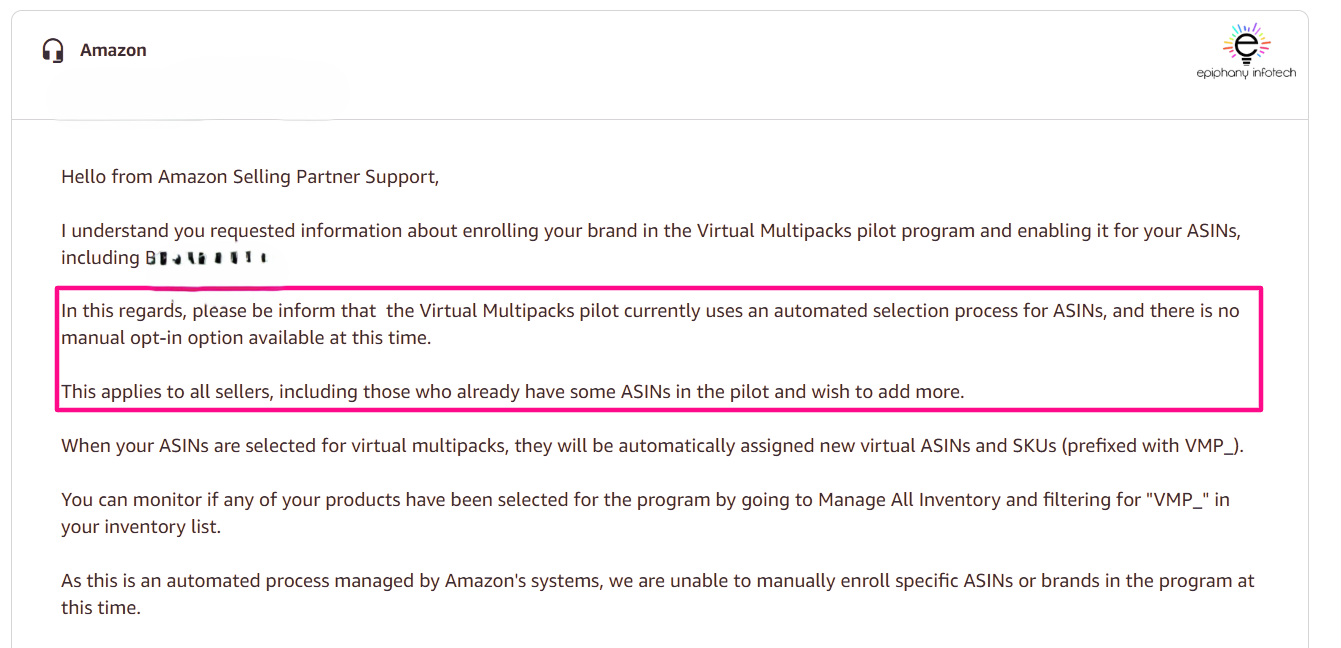
There is no interface, no button, no menu, and no application form to activate Virtual Multipacks. Even Seller Support cannot enable them for you, a point they confirm repeatedly. In fact, Amazon’s multipacks documentation highlights that the feature is generated “automatically by Amazon’s systems” and not by sellers.
So if you’ve been hunting around Seller Central looking for the option to create a multipack, you won’t find it. If Amazon hasn’t enabled it for your ASIN, the feature simply won’t appear.
Amazon determines eligible ASINs using internal criteria (not publicly disclosed), but the documentation confirms:
- Sellers cannot apply or opt in
- ASINs are selected automatically
- Amazon generates new SKUs with the prefix ‘VMP_.’
- Multipacks appear under the same parent listing
- Sellers can edit titles, prices, images, and bullets
- Sellers cannot change the pack size or the variation structure
The help page of Amazon Virtual Multipacks states this explicitly: “Virtual multipacks… will be generated automatically by Amazon’s systems.”
When we reached out to the Seller Support for one of our clients in December 2025, they also confirmed: there is no manual opt-in for this pilot.
Eligibility Requirements (US & UK)
Virtual Multipacks are still in a controlled rollout phase, which means Amazon has not opened them up to every seller or every marketplace. Understanding the eligibility differences between the US and UK makes it clearer why some sellers see these auto-generated multipacks while others don’t.
The United States/USA (Live Pilot Program)
In the US marketplace, Virtual Multipacks are currently live but limited to a pilot group. Amazon runs the feature entirely through automation, selecting ASINs that meet certain internal criteria. While Amazon doesn’t publish the exact formula, it’s clear from both documentation and Seller Support responses that eligible ASINs must be fulfilled by Amazon (FBA), brand-owned, and in good catalog standing. Products that already demonstrate steady sales velocity, clean listing data, and reliable inventory levels are more likely to be chosen.
Importantly, there is no application or manual request process. Sellers cannot open a ticket and ask to be added, nor can Amazon support teams enable the feature on demand. If Amazon decides your ASIN qualifies, the multipack variations simply appear in your catalog automatically. If not, there is nothing you can do to “force” it, other than maintaining excellent listing health and performance.
Based on Amazon’s documentation and support confirmations:
- FBA ASINs only
- Strong-performing brand-owned products
- Amazon automatically decides which ASINs qualify
- Sellers cannot request specific ASIN inclusion
- Appearance of ‘VMP_’ SKUs indicates enrollment
The majority of US sellers are not yet enrolled, making this a competitive advantage if Amazon enables it for your ASINs.
The United Kingdom (Not Yet Publicly Available)
The UK market, on the other hand, has not yet received this feature publicly. While UK sellers can review the US documentation and prepare strategically, the Virtual Multipacks function is not currently generating pack-size variations for UK ASINs. This doesn’t mean it won’t arrive. Amazon often tests new tools in the US before expanding them to Europe, but for now, UK sellers cannot expect the same automation to occur in their catalog.
The best approach for UK sellers is to keep their listings clean, maintain strong account health, and ensure their catalog structure aligns with Amazon’s variation and brand registry standards. Once the UK launch happens (and it likely will), the sellers with the strongest catalog foundations will be the first to benefit.
For UK accounts, the same foundational rule applies:
- You cannot manually create Virtual Multipacks
- You must wait for Amazon to enable it at the catalog level
How to check if you already have Virtual Multipacks?
Here’s the simple way to find out:
Step 1: Go to Seller Central → Manage All Inventory
Step 2: In the SKU search bar, type: ‘VMP_’. If your ASINs were included in the pilot, you will see SKUs like: VMP_2PACK_12345, VMP_3PACK_12345.
Step 3: Open your main ASIN. Scroll to the variation section and look for: “2 Pack”, “3 Pack”, “4 Pack”
Amazon documentation confirms: “When ASINs are selected for Virtual Multipacks, new virtual SKUs (with the ‘VMP_’ prefix) will appear in Manage All Inventory.” If nothing appears, your brand hasn’t been added yet.
What if your account isn’t included in the Pilot?
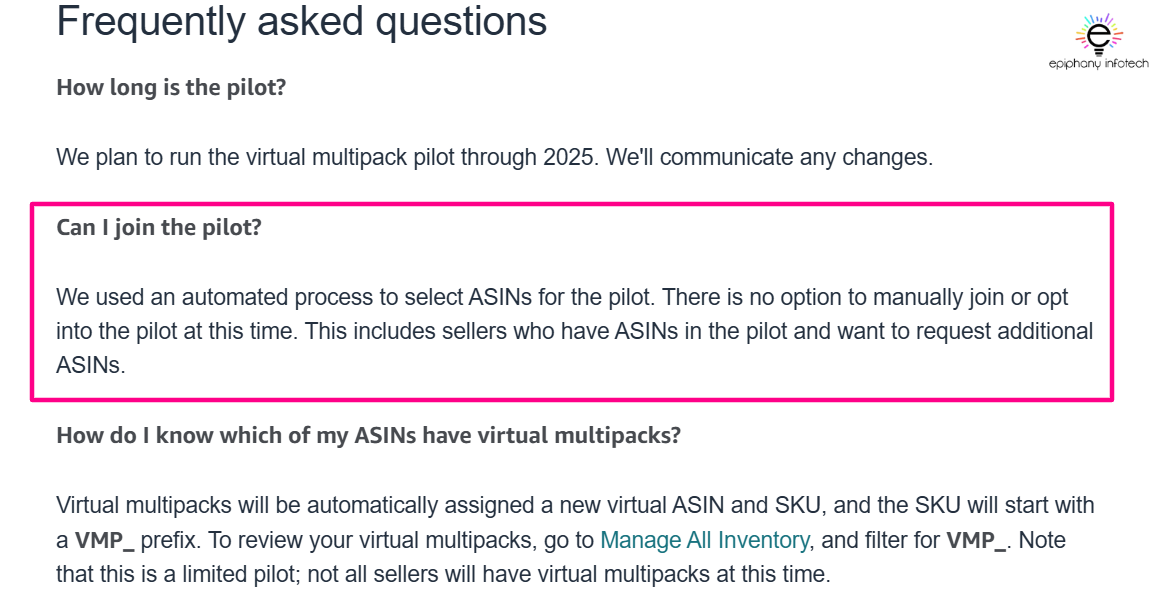
This is the part that creates the most confusion for sellers. While Amazon has introduced Virtual Multipacks as an automated way to generate 2-packs, 3-packs, and 5-packs of the same ASIN, the truth is straightforward:
- You cannot request access to the Virtual Multipacks program.
- Seller Support cannot manually enable it for your account.
- There is currently no way for sellers to create virtual multipacks themselves.
Amazon Support repeats the same guidance consistently:
The Virtual Multipacks pilot is fully automated, and enrollment cannot be performed manually.
However, although you cannot force access, there are several proactive steps that may increase the likelihood of Amazon selecting your ASINs for the pilot. These steps align with Amazon’s preference for clean, stable, high-performing catalog data:
- Maintain strong alignment with Brand Registry.
- Keep healthy FBA inventory levels and avoid going out of stock.
- Remove stranded, blocked, or suppressed listings promptly.
- Improve conversion rates and overall sales velocity through optimized content and advertising.
- Keep variation families clean and accurate, avoiding misuse of parent/child relationships.
- Prevent listing violations or category compliance issues.
Amazon typically prioritizes ASINs with consistent performance, clean data, and minimal operational friction when choosing products for catalog automation programs like Virtual Multipacks.
Benefits of Virtual Multipacks (Why do sellers want it?)
One of the biggest reasons sellers are excited about Virtual Multipacks is the immediate lift in average order value. When a customer chooses a 2-pack or 3-pack instead of a single unit, your revenue per transaction increases without any additional marketing or operational effort. It’s one of the simplest ways to improve profitability because the incremental cost of fulfilling extra units is often far lower than the cost of acquiring a brand-new customer.
Another major advantage is the complete lack of operational overhead. Traditional multipacks required sellers to physically bundle products, pay for prep services, relabel units, create new packaging, and store extra SKUs. Virtual Multipacks remove all of that. Amazon fulfils multi-unit orders using your existing single-unit inventory, which means no new shipments, no extra prepping, and no additional packaging costs. For busy sellers, this alone is a major win.
Virtual Multipacks also strengthen your variation family. Pack-size variations appeal to customers with different buying intentions; some want to try a single unit, others are ready to buy in bulk, and some simply want better value per unit. Bringing these options under one parent listing creates a more complete shopping experience and helps your product appeal to a broader range of customer behaviours. This can lead to better conversion rates across the board.
There’s also a pricing advantage. Because Virtual Multipacks are treated as separate SKUs, you gain flexibility to price them strategically without physically creating new versions of the product. Many brands offer a slight discount on higher pack sizes, which can improve perceived value and help multipacks rank faster.
Multipacks can also broaden your product’s organic reach. Each new variation gives Amazon’s search algorithm more opportunities to surface your listing for multipack-related keywords, terms like “bulk,” “value pack,” “multi roll,” or “family size.” Over time, this saturation can improve ranking stability and visibility within your category.
Finally, from a shopper’s point of view, multipacks simply make the buying process easier. Customers appreciate having multiple quantity options displayed neatly under one listing rather than searching around for separate pack sizes. A clean variation setup feels more professional and reduces friction at checkout.
For all these reasons, it’s no surprise that brands are eager for Amazon to expand the Virtual Multipacks program. The benefits stack quickly, and the impact on both revenue and efficiency can be substantial.
In brief, Virtual Multipacks provide significant advantages:
- Higher Average Order Value (AOV)
- Zero operational cost
- More powerful variation family
- Pricing flexibility
- Increased ranking opportunities
- Improved customer experience
This is why brands want early access; the impact can be substantial.
Limitations sellers must know.
While Virtual Multipacks offer clear advantages, there are important limitations that sellers should understand before relying on the feature:
- Sellers cannot request activation or enrollment into the program.
- Sellers cannot choose or customize pack sizes; Amazon determines these automatically.
- Removing a Virtual Multipack during the pilot may prevent it from being reinstated.
- Virtual Multipacks are not supported for all ASIN types, including certain hazmat, oversized, or restricted items.
- The feature is available only for products fulfilled through FBA.
Being aware of these constraints helps sellers avoid common pitfalls, such as mistakenly deleting ‘VMP_’ SKUs or attempting to force multipacks through the Virtual Bundles tool, which is not designed for same-ASIN multipacks.
How to optimize your Virtual Multipack listings?
Once Amazon generates Virtual Multipacks for your ASINs, they should be managed and optimized just like any other SKU in your catalog. Effective optimization helps each pack size perform independently while strengthening the overall variation family. Consider the following best practices:
- Optimize the title to clearly indicate the pack size (for example, “2-Pack” or “3-Pack”).
- Use images that clearly communicate quantity by adding pack-size labeling or showing multiple units.
- Adjust pricing strategically – multipacks should offer value, but still maintain profitability.
- Include multipack-focused keywords such as “bulk,” “multi roll,” “value pack,” or “wholesale quantity” where appropriate.
- Monitor PPC performance separately for each pack size; different variations may respond differently to advertising.
- Keep inventory levels healthy to avoid stockouts, which can negatively impact ranking and conversion.
Consistent optimization across all variations ensures each multipack ASIN contributes to higher visibility, stronger conversion rates, and improved overall catalog performance.
Conclusion: What sellers should do next?
Virtual Multipacks are one of Amazon’s most seller-friendly innovations in recent years because they combine the power of multipack selling with the ease of automation. If rolled out more widely, they could fundamentally reshape how sellers manage catalog structure, pack sizes, and AOV strategy. While the pilot is currently limited and fully automated, the sellers who understand how the system works and who keep their catalog clean and performing well will be in the best position to benefit as Amazon expands the program.
Keep monitoring your SKUs for VMP_ prefixes, maintain strong listing health, and be prepared for when Amazon decides your ASINs are ready for Virtual Multipacks.
For US sellers, the rollout has already begun. For UK sellers, it’s a matter of time.
If Amazon hasn’t added you to the pilot yet, simply:
- Keep your ASINs optimized
- Maintain clean catalog data
- Strengthen brand performance
- Monitor your inventory for ‘VMP_’ SKUs
As the pilot expands, sellers who understand Virtual Multipacks today will be the ones who benefit first tomorrow.
Once you are logged into Seller Central, you can navigate to these reference links

Experienced digital marketeer obsessed with all things SEO, Amazon, and Google PPC. I love testing, learning, and teaching what actually works. Helping businesses grow – one optimized campaign at a time.