
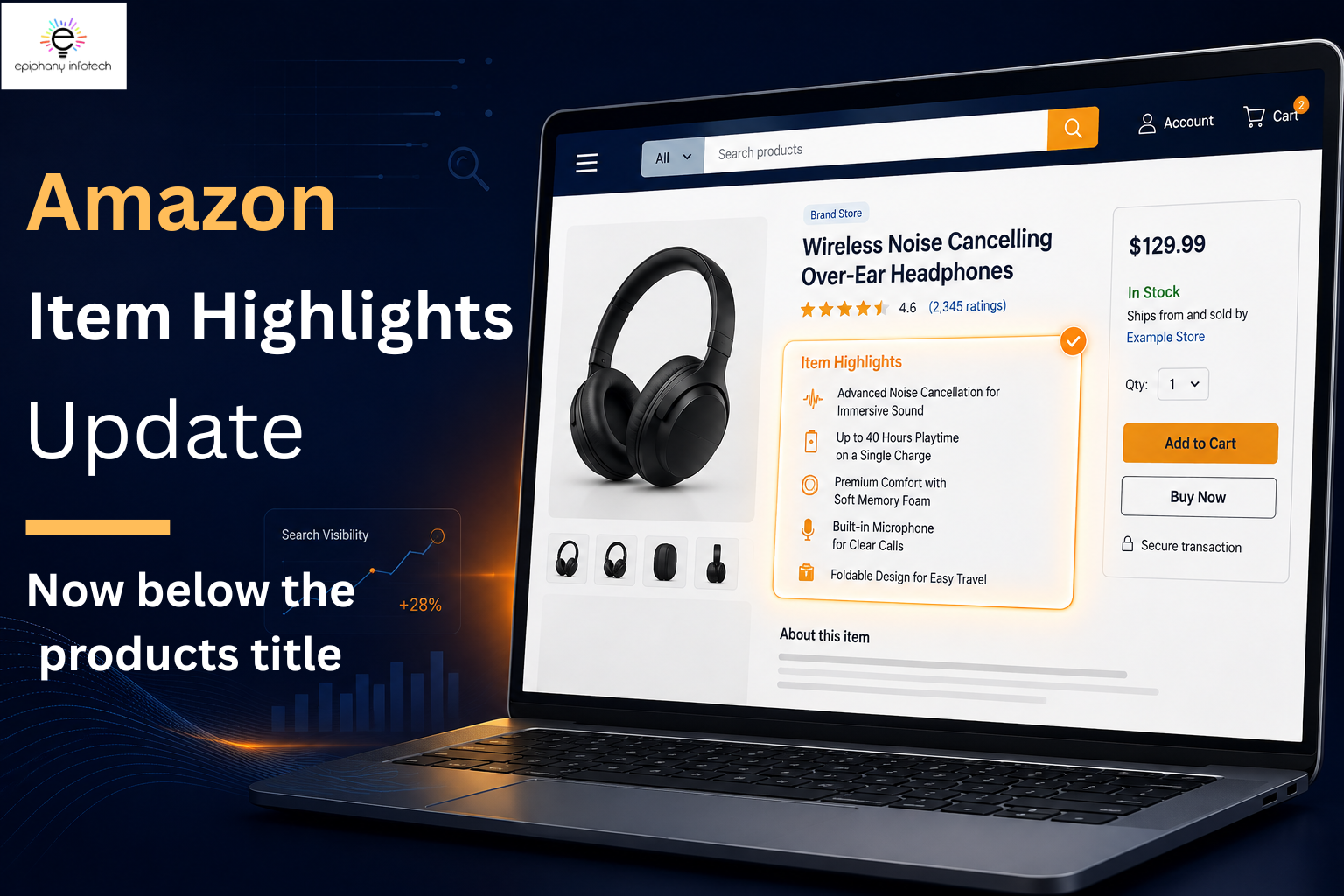
Amazon has introduced Item Highlights, a dedicated space that lets sellers show key product features, materials, recommended use cases, and other supporting details alongside the Item Name. Starting August 10, 2026, Amazon will display Item Highlights directly below the Item Name on desktop and mobile, making these details easier for shoppers to see while browsing a product page.
According to Amazon’s official product title and Item Highlights update, starting July 27, 2026, applicable product titles must stay within 75 characters, while Item Highlights provide another 125 characters for supporting information. Amazon is also providing AI-powered recommendations to help sellers update titles and Item Highlights to meet the new requirements.
What Changed With Amazon Product Titles and Item Highlights?
Amazon’s update introduces a clearer division between the information sellers place in the Item Name and the details they provide in Item Highlights. For applicable categories, product titles are limited to 75 characters, including spaces, starting July 27, 2026, while media products are excluded from this requirement. This means sellers need to prioritize the most important product attributes rather than trying to fit every detail into the title.
The additional 125 characters in Item Highlights give sellers room to provide supporting information, such as materials, recommended use cases, and other details that help shoppers compare products. This makes Amazon listing optimization more about organizing information strategically across both fields rather than simply shortening the title.
The update also changes where shoppers encounter this information. Starting August 10, 2026, Item Highlights will appear directly below the Item Name on desktop and mobile, bringing key supporting details closer to the top of the product page. Amazon also states that Item Highlights are visible with titles in search results and on product detail pages.
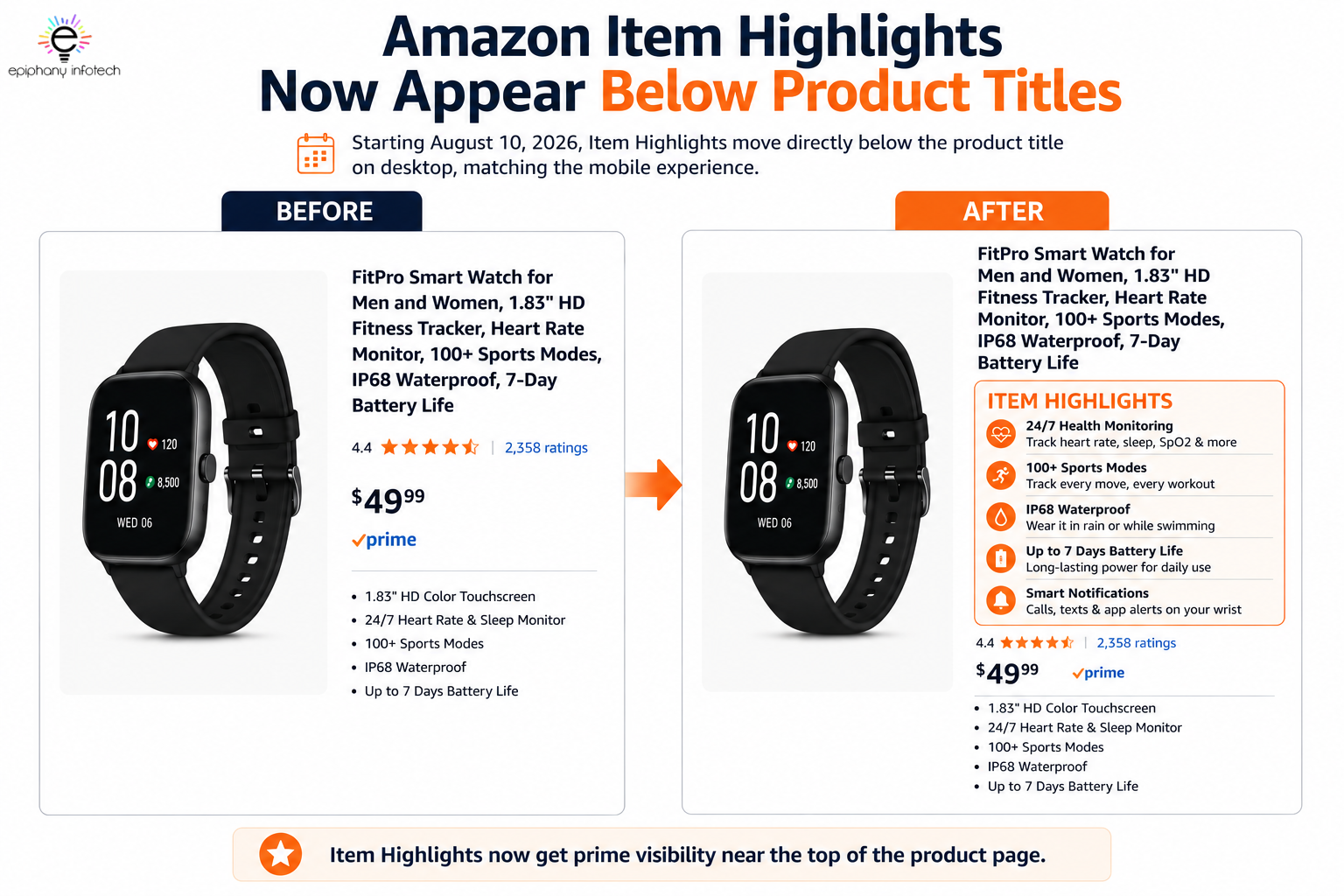
The result is a clearer split between the two fields. The Item Name can focus on identifying the product and its most important attributes, while Item Highlights can add supporting details that help shoppers understand and compare the product.
What Do the New 75-Character and 125-Character Limits Mean for Sellers?
The new limits require sellers to be more selective about what information deserves the most prominent position. The Item Name should prioritize the brand, product type, and most important attributes, while the additional 125-character Item Highlights space can accommodate supporting details that may help shoppers evaluate the product. Amazon specifically recommends moving additional attributes into Item Highlights when they cannot fit within the 75-character Item Name limit.
|
Element |
Character Limit |
Best Use |
|
Item Name |
75 characters |
Brand, product type, key attributes |
|
Item Highlights |
125 characters |
Materials, use cases, supporting details |
|
Combined |
200 characters |
Essential product information |
This doesn’t mean sellers should simply divide the same information between the two fields. Each one should add something different. For example, the Item Name can establish what the product is, while Item Highlights can provide additional context about how, where, or why the product may be useful.
For sellers managing multiple Amazon product listings, this approach can make listing optimization more structured. Instead of shortening a title and losing useful information, sellers can decide which details deserve priority in the Item Name and which can be moved into Item Highlights.
Why Did Amazon Move Item Highlights?
Amazon’s change is designed to make supporting product details easier to find during the initial scan of a product page. With Item Highlights positioned closer to the Item Name, shoppers can see additional information without having to move further down the page. It also brings the desktop and mobile experiences closer together by giving both layouts a more consistent way to present key product details.
For sellers, the change provides a clearer way to structure listing content. Rather than using the Item Name to carry every specification or use case, brands can prioritize the product’s identity and most important attributes there, then use Item Highlights for additional context. This can make Amazon product information easier to organize and more useful when shoppers are comparing similar products.
Why This Update Matters More Than Most Amazon Sellers Realize
This may look like a small interface adjustment, but it changes the amount of attention Item Highlights can receive during a shopper’s initial review of a listing. Amazon shoppers typically move quickly between product pages, comparing factors such as images, pricing, ratings, and product details rather than reading every section in full.
That makes the quality of those few visible details more important.
Instead of treating Item Highlights as extra space to fill, sellers can use them to address practical questions that may influence further consideration. For example, a highlight could clarify a product’s intended use, point out a meaningful feature, or explain a detail that distinguishes it from similar options.
The key is to make the information specific and useful. Generic statements or repeated wording are unlikely to add much value, while concise details that address real shopper concerns can make a listing easier to evaluate and compare.
How Do Item Highlights Affect Amazon Search Visibility?
Item Highlights can contribute to how product information is presented in Amazon search because Amazon states that they are searchable and visible with titles in search results and on product detail pages. This gives sellers another field for communicating relevant information, but the value comes from the quality and relevance of that information—not from using every available character.
Instead of treating Item Highlights as a separate keyword field, sellers should consider how the content fits into the overall product information. The Item Name establishes the product and its primary attributes, while Item Highlights can provide additional context that may help shoppers understand the product more clearly.
When developing Item Highlights, consider the following:
- Search relevance: Use terminology that accurately reflects the product, its characteristics, and intended uses.
- Product terminology: Include specific words that describe materials, functions, applications, or other meaningful attributes when relevant.
- Context: Use the available space to add information that gives shoppers a clearer understanding of the product rather than simply restating the title.
- Distinct information: Each highlight should contribute something different. Avoid using multiple highlights to communicate the same attribute.
- Natural wording: Write for people first. Relevant terms should fit naturally into the content rather than making the copy difficult to read, while keeping product information accurate and consistent with Amazon seller policies.
- Shopper intent: Consider what someone comparing products would need to know at this stage of their decision. Useful details can address questions about materials, applications, features, or suitability.
The important distinction is between adding relevant information and adding more keywords. Because Item Highlights are searchable, sellers should make the space informative and product-specific while keeping the content clear enough for shoppers to understand at a glance.
Product Titles vs. Item Highlights: What’s the Difference?
Product titles and Item Highlights serve different purposes within an Amazon listing. The Item Name identifies the product and communicates its most important attributes, while Item Highlights provide additional information that can help shoppers understand the product more fully. Keeping these roles separate also prevents the same information from being repeated across both fields.
|
Product Title / Item Name |
Item Highlights |
|
Identifies the product |
Adds supporting product information |
|
Includes the brand and key attributes |
Provides relevant features, materials, or use cases |
|
Focuses on the product’s identity |
Adds context that may help shoppers compare options |
|
Communicates the most important varying attributes |
Addresses useful product-related questions |
|
Gives shoppers a quick understanding of what the product is |
Expands on details that may not fit within the title |
For example, if the Item Name already identifies a product as a stainless steel insulated water bottle, repeating those same words in Item Highlights adds little value. The additional space could instead provide information such as leak-resistant design, 24-hour cold retention, or travel and workout use.
The distinction is simple: the Item Name establishes the product, while Item Highlights add useful context. When both fields contribute different but related information, sellers can make better use of the available character space without making the listing repetitive.
How to Write Amazon Item Highlights That Actually Convert
Effective Item Highlights should help shoppers understand what makes a product useful in a specific situation. With only 125 characters available, sellers need to prioritize information that adds meaning rather than simply describing the product again.
A useful approach is to connect a product attribute with its practical value. Instead of treating the highlight as a specification, show how that specification relates to the customer’s needs.
Feature vs. Benefit
Feature:
Stainless Steel Water Bottle
This identifies the material but provides little context about why it matters to the shopper.
Benefit-focused highlight:
24-hour cold retention, leak-resistant design, travel and workout use
The second version combines specific product attributes with relevant use cases. It gives shoppers more information to evaluate the product without repeating the Item Name.
What Should Your Item Highlights Answer?
Before writing an Item Highlight, sellers should consider what information a shopper is likely to need after identifying the product. The strongest highlights often address details that are difficult to communicate efficiently in the Item Name but can influence whether the product is relevant to a particular use case.
Consider questions such as:
- What practical problem does the product address? Focus on a genuine function or use rather than making a broad claim.
- Which feature has the most practical importance? Prioritize characteristics that affect how the product is used.
- What material, specification, or compatibility detail matters? Include information that can help shoppers determine whether the product fits their requirements.
- Where or how is the product intended to be used? Relevant use cases can help shoppers quickly assess suitability.
- What distinguishes the product from comparable options? Highlight meaningful differences rather than generic claims such as “high quality” or “premium.”
- What information could prevent uncertainty before purchase? Consider details that answer common questions or clarify an important product characteristic.
Amazon recommends using comma-separated phrases rather than full sentences for Item Highlights. That makes precision particularly important: every phrase should communicate a distinct piece of useful information. Sellers should avoid filling the available characters with repeated keywords, vague promotional language, or details that have already been covered in the Item Name.
The best Item Highlights work as supporting information, not standalone advertisements. When each phrase adds a relevant feature, specification, material, or use case, shoppers can understand the product more quickly and determine whether it meets their needs without having to search through the rest of the listing.
How Amazon’s AI Recommendations Could Change Your Listings
According to Amazon’s official Seller Central guidance, AI-powered recommendations are available to help sellers update Item Names and Item Highlights to meet the new requirements. The recommendations are designed to keep important product information in the Item Name while moving additional details into Item Highlights.
Sellers can access these recommendations through Manage All Inventory → Edit → View enhancements. However, AI-generated copy should still be reviewed before approval to ensure it accurately represents the product, retains important attributes, avoids unnecessary repetition, and follows Amazon’s requirements.
Amazon says titles that remain over 75 characters after July 27 will be gradually updated to the AI recommendation, while listings remain active during the process. Brand owners also receive a 14-day period to review, modify, and approve AI-generated recommendations before implementation.
Common Mistakes Sellers Should Avoid
With Item Highlights becoming more visible, weak listing copy will be harder to overlook. Sellers who treat this section as extra space for keywords may miss the bigger opportunity. The goal should be to help shoppers understand the product quickly, not simply to fill every available character.
Some common mistakes include:
- Copying the product title: Repeating the same information wastes valuable space.
- Keyword stuffing: Adding keywords where they don’t naturally fit can make the copy difficult to read.
- Making vague claims: Words like “premium,” “high-quality,” or “best” mean little without proof or context.
- Listing specifications without context: A technical feature is more useful when shoppers understand how it benefits them.
- Ignoring customer questions: If shoppers commonly wonder about compatibility, size, use, or performance, address those concerns.
- Using generic messaging: Highlights that could describe dozens of competing products won’t help your listing stand out.
The biggest mistake is treating Item Highlights as an afterthought. They now have visibility, search value, and a direct connection to the shopper’s first impression. That makes thoughtful, customer-focused copy more important than ever.
What Amazon Sellers Should Do Right Now

Sellers don’t need to rewrite every listing blindly. A better approach is to review listings systematically and prioritize products where improved messaging can have the biggest impact.
1. Review the Item Name
Check whether the Item Name stays within the 75-character limit, including spaces. Keep the brand, product type, and most important attributes in this field.
2. Rewrite Your Item Highlights
Use the additional 125 characters for supporting information such as materials, recommended use cases, and relevant product details.
Don’t use the space simply because it’s available.
3. Remove Duplicate Information
Compare the Item Name and Item Highlights side by side. If the same phrase appears in both, ask whether the second mention adds anything.
If it doesn’t, replace it with useful information.
4. Improve Search Relevance
Look for relevant terms that accurately describe the product and match how shoppers may search for it. Use related terms naturally rather than repeating the same keyword.
5. Review Amazon’s AI Recommendations
Check Amazon’s suggested titles and Item Highlights in View enhancements. Don’t approve recommendations automatically. Make sure the suggested copy accurately represents the product and keeps the information that matters most.
6. Review the Rest of the Listing
The title and Item Highlights are only part of the product page. Check the rest of the listing for consistency, including:
- Bullet points
- Backend search terms
- Product descriptions
- A+ Content
- Product images
If your catalog contains listings that need broader product-page work, you can also review listing products on Amazon as part of the optimization process.
Pros and Cons of Amazon’s Item Highlights Update
Amazon’s update gives sellers more room to communicate product value, but it also raises the bar for listing quality. Item Highlights are now harder to overlook, which means strong copy can make a listing more useful while weak copy can become even more obvious.
|
Pros |
Cons |
|
Better visibility for Item Highlights |
Existing listings may need rewriting |
|
More opportunities to influence buying decisions |
Poor messaging becomes more noticeable |
|
Additional search indexing opportunity |
Sellers need to rethink keyword placement |
|
Easier access to key product information |
Generic highlights can waste valuable space |
|
Encourages stronger customer-focused messaging |
Competitive listings may become harder to differentiate |
For sellers who already use clear, benefit-focused copy, the update creates a useful opportunity to get more value from an existing part of the listing. But brands relying on repetitive titles, generic claims, or keyword-heavy copy may need to rethink their approach.
The biggest advantage isn’t simply getting Item Highlights seen by more shoppers. It’s having another highly visible space to communicate something useful before the buying decision is made.
Final Thoughts
Amazon didn’t introduce a brand-new feature. It simply gave an overlooked part of the product listing a much more prominent place. With Item Highlights now appearing directly below product titles, sellers have a better opportunity to communicate value early, answer real customer questions, and highlight the benefits that can influence a buying decision. Simply repeating the title won’t be enough. The brands that use this space to explain why their product matters will have a better chance of standing out.
Amazon is making those first few seconds of the product page count even more. Sellers should use this update as an opportunity to review their titles, Item Highlights, and overall listing strategy. At Epiphany Infotech, we help Amazon sellers optimize their listings with a focus on search visibility, clear messaging, and stronger conversions, so every part of the product page has a purpose.
Frequently Asked Questions About Amazon Item Highlights
What are Amazon Item Highlights?
Item Highlights are an additional space for product information that can help shoppers understand and compare products. Amazon provides up to 125 characters for details such as materials and recommended use cases.
How many characters can an Amazon product title have?
For applicable categories, Amazon product titles must be 75 characters or fewer, including spaces. Media products are excluded from this requirement.
How many characters can Amazon Item Highlights contain?
Item Highlights provide an additional 125 characters for supporting product information.
When will Item Highlights appear below product titles?
Starting August 10, 2026, Item Highlights will appear directly below the Item Name across desktop and mobile.
Are Amazon Item Highlights searchable?
Yes. Amazon says Item Highlights are searchable and visible with titles in search results and on product detail pages.
Should Item Highlights repeat the product title?
No. Repeating the title wastes the additional space. The Item Name should establish the product and its most important attributes, while Item Highlights should provide useful supporting information.
How should sellers write Item Highlights?
Amazon recommends using comma-separated phrases rather than full sentences. Sellers can use the space for relevant information such as materials, recommended use cases, and other details that help shoppers compare products.
Can sellers use keywords in Item Highlights?
Yes. Since Amazon says Item Highlights are searchable, relevant product terms can be included naturally. However, sellers should avoid keyword stuffing and unnecessary repetition.
Can Amazon automatically change product titles?
Amazon says titles that remain over 75 characters after the July 27 change will be gradually updated to its AI recommendation. Listings remain active during the process, and sellers can make changes to their titles and Item Highlights.
How can sellers review Amazon’s AI recommendations?
Sellers can go to Manage All Inventory, select Edit for the relevant listing, and then choose View enhancements to see Amazon’s recommendations for titles and Item Highlights.
Can brand owners review AI-generated recommendations?
Yes. Amazon says brand owners receive 14 days to review, modify, and approve AI-generated recommendations through Review Listings Changes before implementation.
Should sellers rewrite every Amazon listing immediately?
Not necessarily. Start with important listings, especially those with titles over the new character limit or Item Highlights that are repetitive, outdated, or unhelpful. Then monitor performance after making changes.
How long do Amazon listing changes take to appear?
Amazon’s product title guidelines indicate that changes to the Item Name and Item Highlights can take 24 to 48 hours to appear after submission.

Experienced digital marketeer obsessed with all things SEO, Amazon, and Google PPC. I love testing, learning, and teaching what actually works. Helping businesses grow – one optimized campaign at a time.